


How CRM Workflow Automation Can Create a More Consistent Customer Experience
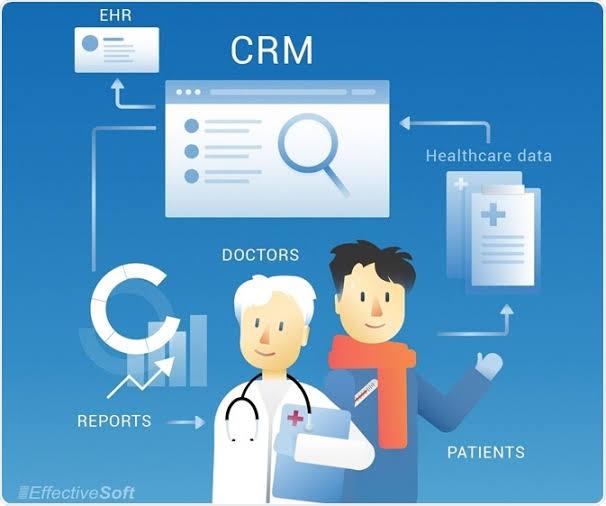
Customers interact with businesses through many different channels. They may discover a company through search, submit a website form, speak with a salesperson, receive marketing emails, purchase a product, and later contact customer service. Every interaction contributes to their overall experience.
The challenge for growing businesses is keeping these interactions connected. When customer information is scattered across different systems or teams, employees may not know what happened previously. Follow-ups can be missed, information may need to be requested again, and customers can receive inconsistent communication.
CRM workflow automation can help businesses create more connected customer experiences by turning repetitive processes into structured workflows. Instead of relying on employees to manually coordinate every customer interaction, businesses can use automated triggers, notifications, data updates, and task assignments to keep processes moving.
For companies across the USA and Canada, this approach can support customer experience while also reducing unnecessary administrative work.
Why Consistency Matters in Customer Experience
Consistency does not mean every customer should receive exactly the same message.
Instead, it means that customers should experience a reliable process regardless of which employee or department they interact with.
For example, if a customer has already explained a problem to support, they should not necessarily have to explain the same situation to another team member.
If a prospect has already received a proposal, a follow-up conversation should ideally reflect that history.
A connected CRM can give employees access to relevant customer information, while automation can make sure important actions happen at the right time.
1. Create a Unified Customer Record
The foundation of a consistent customer experience is reliable information.
A CRM can bring customer details, sales activities, service interactions, and other relevant information into a central record.
Instead of checking multiple spreadsheets or applications, employees can access a shared view of the relationship.
A customer record may include:
-
Contact information
-
Previous purchases
-
Sales conversations
-
Open opportunities
-
Support requests
-
Communication history
-
Account ownership
-
Important dates
A CRM with workflow automation can then use this information to trigger appropriate actions.
For example, when a customer submits a support request, the CRM can identify the account owner and make relevant information available to the service team.
2. Respond to Customer Actions Automatically
Customers constantly generate signals through their interactions with a business.
They may submit forms, request information, book appointments, make purchases, or contact support.
Instead of requiring employees to monitor every action manually, workflows can respond automatically.
For example:
Customer requests a quote → CRM creates opportunity → Sales task assigned → Notification sent
Or:
Customer completes purchase → Account updated → Onboarding workflow started
This creates a more predictable internal process.
Employees know what action is expected, while customers benefit from fewer delays.
3. Personalize Communication Without Adding More Manual Work
Personalization can improve communication, but manually creating every customer interaction is not practical for most growing businesses.
Automation can use CRM information to determine which communication or task is appropriate.
For example, a new customer may receive onboarding information, while a long-term customer may receive an account review reminder.
A prospect who has requested pricing may receive different follow-up treatment from someone who has only downloaded an introductory guide.
The technology handles the process, while employees can still provide the human communication where it matters.
4. Improve Customer Onboarding
The first few interactions after a purchase can shape how customers view the business.
Onboarding may include account setup, training, documentation, implementation, or product support.
Without a structured process, employees may forget individual steps.
CRM workflow automation can create a standardized onboarding sequence.
For example:
-
Deal marked as closed.
-
Customer record updated.
-
Account owner assigned.
-
Onboarding tasks created.
-
Welcome communication scheduled.
-
Follow-up reminder created.
-
Customer success team notified.
The exact process can be adapted to the business.
The important point is that employees do not have to remember every step manually.
5. Reduce Delays Between Departments
Customers often move between departments during their relationship with a business.
Marketing may generate the lead. Sales may close the deal. Customer success may handle onboarding. Support may later resolve technical issues.
If these teams operate independently, customers can experience delays.
Automation can create structured handoffs.
When an opportunity becomes a customer, the CRM can automatically notify the customer success team and create the necessary onboarding tasks.
When a support issue is resolved, the account manager can be notified if the situation is relevant to the broader relationship.
This creates better internal coordination without requiring constant emails between departments.
6. Connect Your CRM With Other Business Tools
A CRM may contain important customer information, but other business systems often hold additional details.
A company may use separate platforms for:
-
Accounting
-
E-commerce
-
Email marketing
-
Customer support
-
Scheduling
-
Project management
-
Document storage
-
Communication
When these systems are disconnected, employees may have to transfer information manually.
CRM integration services can help businesses connect these systems.
For example, an online purchase could update the CRM automatically. A new support case could be associated with the customer's account. A scheduled meeting could create an activity in the CRM.
This reduces duplicate data entry and gives employees better access to relevant information.
For businesses using Microsoft Dynamics, microsoft dynamics CRM integration services can help connect Dynamics-based processes with other applications and workflows.
Microsoft Power Automate provides capabilities for connecting Dynamics 365 with other services and automating processes across business applications.
7. Make Customer Service More Contextual
Good customer service requires context.
A service representative should ideally understand who the customer is, what they purchased, and what interactions have already occurred.
CRM automation can help make this information available at the right time.
For example, when a support case is created, the workflow can associate it with the relevant customer account and notify the appropriate team.
The system can also create follow-up tasks when an issue requires additional action.
Microsoft's Dynamics 365 customer service documentation describes automation capabilities that can help reduce repetitive tasks and connect customer service processes with other systems.
The service representative can then focus on resolving the customer's issue instead of spending excessive time organizing administrative information.
8. Use AI to Understand Customer Signals
Modern CRM platforms can combine workflow automation with artificial intelligence.
AI can help businesses analyze customer information and identify patterns that might otherwise be difficult to spot manually.
Potential applications include:
-
Summarizing customer conversations
-
Identifying engagement patterns
-
Supporting lead prioritization
-
Highlighting accounts that need attention
-
Suggesting follow-up activities
-
Helping employees understand recent interactions
For example, if a customer has repeatedly contacted support about the same issue, AI could help surface that pattern for an employee.
The employee can then decide what action is appropriate.
This is where AI CRM integration services can help organizations connect AI capabilities with their existing customer processes.
9. Build Proactive Retention Workflows
Customer experience is not only about responding to problems.
Businesses can also use CRM workflows to identify situations that deserve attention before a customer decides to leave.
Possible triggers include:
-
Approaching renewal dates
-
Declining engagement
-
Repeated support requests
-
Missed appointments
-
Reduced purchasing activity
-
Unresolved customer feedback
When one of these events occurs, the CRM can create a task for an account manager.
This gives businesses an opportunity to understand what is happening and respond appropriately.
Automation does not determine why a customer is disengaging. It simply makes sure the relevant employee knows that the account may need attention.
10. Keep Follow-Ups From Falling Through the Cracks
Customers often judge a business by whether it follows through on its promises.
A salesperson may promise to send information. A service representative may promise an update. An account manager may agree to schedule a review.
These commitments can be converted into CRM tasks.
A workflow can create reminders, notify owners, and escalate overdue activities.
For example:
Follow-up due → Employee reminder → No completion → Manager notification
This creates a structured accountability process.
It also reduces the risk that important customer commitments depend solely on someone's memory.
How AI Sales Automation Tools Help Small Businesses Increase Revenue
Small businesses often have limited employees but still need to provide a professional customer experience.
Sales representatives may handle prospecting, follow-ups, meetings, CRM administration, and existing customer relationships.
AI sales automation tools can help small businesses increase revenue by supporting activities such as lead prioritization, interaction summaries, sales follow-ups, and customer data organization.
When combined with CRM workflow automation, these capabilities can reduce repetitive administrative work and help employees focus on customers who need direct attention.
For smaller companies, even a few well-designed workflows can make daily operations easier to manage.
Automation Should Support Employees, Not Replace Them
Customer experience depends on human understanding.
A workflow can identify an inactive customer, but an employee needs to understand why the customer has become less engaged.
AI can summarize a conversation, but an employee should determine how to handle a sensitive situation.
Automation can create a support task, but a service representative should decide how to resolve the issue.
The strongest CRM strategies use technology to handle predictable work while leaving important relationship decisions to people.
Measuring Customer Experience Improvements
Businesses should measure whether their automation strategy is actually improving customer operations.
Useful metrics include:
Response Time
How quickly do customers receive a response after an inquiry?
Resolution Time
How long does it take to resolve service requests?
Follow-Up Completion
Are promised customer follow-ups happening on schedule?
Onboarding Completion
Are new customers moving through onboarding consistently?
Customer Retention
Are customers continuing their relationships with the business?
Employee Productivity
How much administrative time has automation removed?
These measurements can help businesses identify which workflows are delivering practical value.
Avoiding an Over-Automated Customer Experience
Automation can become counterproductive if businesses use it without considering the customer's perspective.
Customers do not want to receive irrelevant messages simply because a workflow was triggered.
Businesses should therefore review automated communications regularly.
A good workflow should have:
-
A clear purpose
-
A relevant trigger
-
Appropriate timing
-
Accurate customer data
-
A clear owner
-
A way to involve a human when necessary
The objective is not to make every interaction automated. It is to make the overall customer journey more organized.
Creating a Long-Term CRM Automation Strategy
Businesses should think about CRM automation as an ongoing process rather than a one-time software project.
Start by identifying customer experience gaps.
Then determine whether the problem is caused by:
-
Missing information
-
Manual processes
-
Poor communication
-
Delayed handoffs
-
Disconnected systems
-
Lack of follow-up
Once the cause is understood, automation can be designed around the specific problem.
As the business grows, new workflows can be added and existing ones refined.
Conclusion
A consistent customer experience depends on more than good communication. It requires accurate information, reliable processes, timely follow-ups, and coordination between departments.
CRM workflow automation can support all of these areas by connecting customer actions with appropriate internal responses.
From lead capture and onboarding to customer service, retention, and follow-up, automation can help businesses create a more organized customer journey while reducing repetitive administrative work.
When combined with CRM integration services and carefully selected AI capabilities, businesses can build systems that help employees understand customers and respond more effectively.
The goal is not to remove the human element from customer relationships. It is to remove unnecessary friction so employees have more time to provide the human element that customers value. Businesses exploring this approach can work with Soft-korner to develop CRM automation and integration processes that fit their existing systems and operational requirements.
FAQs
1. How does CRM workflow automation improve customer experience?
It can help businesses respond to customer actions more consistently, automate follow-ups, improve information sharing, and coordinate activities between different departments.
2. Can CRM automation personalize customer interactions?
Yes. Workflows can use customer information, lifecycle stages, interests, and previous interactions to determine which tasks or communications are appropriate.
3. What role does CRM integration play in customer experience?
CRM integration connects customer information across different business systems, helping employees access more complete information and reducing repetitive data entry.
4. Can AI be combined with CRM workflow automation?
Yes. AI can assist with customer interaction summaries, lead prioritization, pattern recognition, and other information-heavy tasks that support automated workflows.
5. Should customer service be fully automated?
No. Automation can handle routing, notifications, reminders, and other repetitive activities, but customer service situations requiring judgment, empathy, or problem-solving should involve human employees.

 English
 Arabic
 French
 Spanish
 Deutsch
 Turkish
 Dutch
Dutch
 Italiano
 Russian
 Romaian
 Portuguese (Brazil)
 Greek
Greek